
22 KiB
Executable File
OBUSPA Internal USP Services
This document describes how to use OBUSPA to provide USP Internal Services
Overview
USP Internal Services are described in detail on the Broadband Forum website here:-
https://usp.technology/specification/index.html#sec:software-modularization-theory-of-operations
Features
USP Services provide broadly two features:-
-
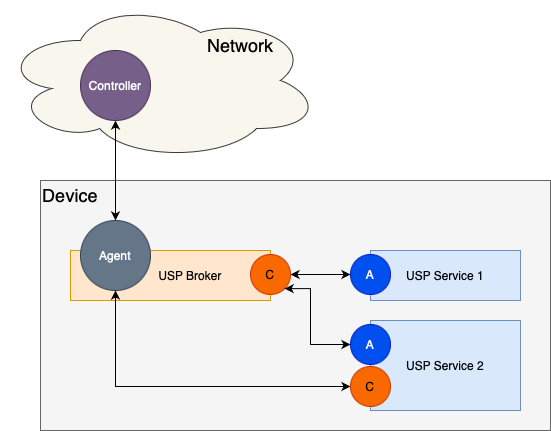
Allow applications running on a device to register part of their data model with the USP Agent. This exposes that part of the data model to any cloud services or other USP Services (with permission) to access and control that service. Note that when the USP Agent is running in conjunction with USP Services, it is typically referred to as the USP Broker. A USP Broker acts as both an Agent in the conventional sense, but also as a Controller with respect to any USP Services registering with it.
-
Allow applications running on a device to control (subject to permission) the Broker and other USP Services.
Building support for USP Services
USP Broker support is enabled by default. It can be explicitly disabled by defining "REMOVE_USP_BROKER" in /src/vendor/vendor_defs.h
Running OBUSPA as a Broker
The Broker is enabled by default. However, some configuration is necessary in order to configure the Unix domain sockets used by USP Services. In addition, if we are running several instances of OBUSPA, it is necessary to change some command line options to ensure a different database file and CLI socket path are used for each instance.
OBUSPA stores its configuration in a database file, the path of which can be provided as a command line option. https://github.com/BroadbandForum/OBUSPA/blob/master/QUICK_START_GUIDE.md contains a detailed description of this database in the section entitled "Running OB-USP-AGENT for the first time".
We need to copy and modify the factory_reset_example.txt to broker_reset.txt and add additional data model entries that OBUSPA uses to instantiate the domain sockets used by the UDS backend. Though different configurations are possible, it is recommended (for interoperability) that the Broker creates two listening sockets. Each USP Service will connect/disconnect as necessary and register its data model with the Broker. One of these sockets is used when the USP Service is acting as an data model provider to the Broker's Controller. The other socket is used when the USP Service is acting as a Controller of the Broker's Agent.
Configuring the Broker's Controller socket
The following well known path should be used to configure the Broker's Controller socket. OBUSPA will use this information to create a listening socket at the specified path that a USP Service's Agent can connect to.
Device.UnixDomainSockets.UnixDomainSocket.1.Alias "cpe-1"
Device.UnixDomainSockets.UnixDomainSocket.1.Mode "Listen"
Device.UnixDomainSockets.UnixDomainSocket.1.Path "/var/run/usp/broker_controller_path"
OBUSPA will create and configure the database the first time it is run. Note that OBUSPA will only use these factory default values if no database already exists. If you wish to change the default parameters then you must remove the existing database. In the below command, '-f' selects usp_broker.db as the database (instead of the default usp.db) and '-s' selects broker_cli as the CLI socket (instead of the default usp_cli).
obuspa -f /usr/local/var/obuspa/usp_broker.db -s /tmp/broker_cli -p -v 4 -r broker_reset.txt -i enp0s3
Configuring a USP Service to connect to the Broker
A second instance of OBUSPA can be used as the basis for a USP Service. It must also be told to connect to the Broker's (listening socket) Controller path. Using factory_reset_example.txt as a starting point, copy and modify to service1_reset.txt and add the following lines:-
Device.LocalAgent.EndpointID "proto::service1"
Device.UnixDomainSockets.UnixDomainSocket.1.Alias "cpe-1"
Device.UnixDomainSockets.UnixDomainSocket.1.Mode "Connect"
Device.UnixDomainSockets.UnixDomainSocket.1.Path "/var/run/usp/broker_controller_path"
Note the the Endpoint ID is set differently for the USP Service to "proto::service1". By default the USP Endpoint ID is derived from the network adapter MAC address. Each Endpoint ID must be unique which will plainly not be the case if we continue to use the default MAC address besed endpoint ID. For each USP Service we set an appropriate Endpoint ID in the settings database that identifies that Service.
obuspa -f /usr/local/var/obuspa/usp_server1.db -s /tmp/service1_cli -p -v4 -r service1_reset.txt -i enp0s3
Running the above command in a second terminal (whilst the Broker is active in the first terminal) should output some debug that indicates the two instances of OBUSPA are communicating over the socket. We should see the USP Ssrvice attempt to connect to the Broker over the UDS connection:-
Sending UDS HANDSHAKE to endpoint_id=UNKNOWN on Broker's Controller path
Received UDS HANDSHAKE from endpoint_id=os::012345-080027352E99 on Broker's Controller path
And the Broker should accept the connection from the Service and return the handshake:-
Received UDS HANDSHAKE from endpoint_id=proto::service1 on Broker's Controller path
Sending UDS HANDSHAKE to endpoint_id=proto::service1 on Broker's Controller path
Implementing a USP Service "Data Model Provider" using a vendor backend
A developer may choose to use OBUSPA as the basis for developing an application that is remotely configurable by registering it's data model. This section provides a simple example that demonstrates how this might be achieved. Note that QUICK_START_GUIDE.md contains more detailed examples of how to add to the data model of OBUSPA. This section focusses on how this is used in conjunction with USP Internal Services.
Configuring a Controller ACS to manipulate the data model is beyond the scope of this example. In this short tutorial we use OBUSPA's built-in CLI functionality as a developer tool to connect to the Broker instance to get/set values belonging to the USP Service.
Src\vendor\vendor.c by default contains a skeleton vendor implementation that provides stub functions that we can use to add our own data model values. We will modify VENDOR_Init() to create a dummy object whose parameters are stored in the Service's database. We'll also add a callback function to notify us of any changes made to the value of ParamA.
We only want to initialise this USP Service object for the Service instance of OBUSPA and not the Broker instance. As both processes will share the same executable binary, we will use the RUNNING_AS_A_USP_SERVICE() macro to only register the data model parameters in the case where we are running as the Service :-
#include "common_defs.h"

int NotifyChange_ServiceA_ParamA(dm_req_t *req, char *value)
{
    USP_LOG_Info("%s enter : value %s", __FUNCTION__, value);
    return USP_ERR_OK;
}

int VENDOR_Init(void)
{
    int err = USP_ERR_OK;
    if (RUNNING_AS_USP_SERVICE())
    {
        err |= USP_REGISTER_Object("Device.Test.ServiceA", NULL, NULL, NULL, NULL, NULL, NULL);
        err |= USP_REGISTER_DBParam_ReadWrite("Device.Test.ServiceA.ParamA", "default_A", NULL, NotifyChange_ServiceA_ParamA, DM_STRING);
    }
    return USP_ERR_OK;
}
After recompiling OBUSPA we need to run both the Broker and the Service instances. The Service will connect to the Broker and register "Device.Test". Then we will verify that we can query and update our USP Service data model object from the Broker. First make sure the Broker is running in one terminal:-
obuspa -f /usr/local/var/obuspa/usp_broker.db -s /tmp/broker_cli -p -v 4 -i enp0s3
And confirm that the Device.Test object is NOT visible in the data model. We haven't started the "service" instance of OBUSPA yet, so there is no Test object instantiated or registered with the Broker.
obuspa -s /tmp/broker_cli -c get Device.Test.
DM_PRIV_GetNodeFromPath: Path is invalid: Device.Test
Then start the USP Service instance of OBUSPA in a second terminal, this time adding the -R option and specifying the path to the object to register with the Broker:-
obuspa -f /usr/local/var/obuspa/usp_server1.db -s /tmp/service1_cli -p -v4 -i enp0s3 -R "Device.Test."
And query the Broker again to validate that Device.Test to confirm that this time Device.Test is registered and accessible:-
obuspa -s /tmp/broker_cli -c get Device.Test.
Device.Test.ServiceA.ParamA => default_A
We can use the OBUSPA CLI to instruct the Broker to change the value of service1 paramA value:-
obuspa -s /tmp/broker_cli -c set Device.Test.ServiceA.ParamA obuspa_is_great
Device.Test.ServiceA.ParamA => obuspa_is_great
obuspa -s /tmp/broker_cli -c get Device.Test.
Device.Test.ServiceA.ParamA => obuspa_is_great
Check the log output from service1 instance of OBUSPA to verify that the parameter was changed:-
SET : processing at time 2023-09-07T13:26:41Z
NotifyChange_ServiceA_ParamA enter : value obuspa_is_great
Implementing a USP service "as a controller" vendor backend
In the previous example we created a vendor backend that, as an Agent, registered its datamodel with the Broker allowing Controllers to manipulate that Service. This section describes how a Service can also act as a Controller, thus allowing it to query and manipulate other USP Services via the Broker instance. We must start by modifying vendor.c to include usp_service.h. This header contains the API definitions required to issue Controller messages to the Broker.
#include "usp_service.h"
The functions provided by this API allow your vendor specific application code to interact with the broker's data model, including data model paths registered by other USP services. Each function will block until it recieves a response or times out after the specified number of seconds. An error code is returned indicating the success or failure of the request. A comprehensive description of each functions parameters can be found in the source code.
int USP_SERVICE_Get(kv_vector_t *params, int timeout, char *err_msg, int err_msg_len);
int USP_SERVICE_Set(kv_vector_t *params, int timeout, char *err_msg, int err_msg_len);
int USP_SERVICE_Add(char *path, kv_vector_t *params, int timeout, int *instance, char *err_msg, int err_msg_len);
int USP_SERVICE_Delete(char *obj_path, int timeout, char *err_msg, int err_msg_len);
int USP_SERVICE_GetSupportedDM(char *obj_path, int timeout, kv_vector_t *paths, char *err_msg, int err_msg_len);
int USP_SERVICE_GetInstances(char *path, int timeout, str_vector_t *instances, char *err_msg, int err_msg_len);
int USP_SERVICE_Operate(char *cmd_path, kv_vector_t *args, int timeout, char **cmd_key, char *err_msg, int err_msg_len);
We need some way to issue control commands to the Service. We will implement a vendor backend that behaves that provides a CLI interface. This is similar to how we used the CLI in the datamodel provider example earlier. The difference is that the control commands are issued from our Service to the Broker over USP protocol (previously the CLI commands were executing on the Broker itself).
An Example calling GET and SET
This section illustrates how to implement a vendor backend that takes control commands as input from the command line, interprets and executes them, displays the result and then loops back around to wait for more input.
Because the API functions will block the calling thread until they receive a response, we should create our own worker thread to perform this task. In VENDOOR_Start() we can spawn a thread using ControllerThread as the entry point:-
#include "os_utils.h"

int VENDOR_Start(void)
{
    int err = USP_ERR_OK;
    err = OS_UTILS_CreateThread("ctrler", ControllerThread, (void*)NULL);
    return err;
}
We can use the readline library to provide a more functional command line and provide a useful command history. To link against a dynamic library modify /src/vendor/vendor.am and add the linker argument:-
eco_envoy_LDFLAGS += -lreadline
This example is limited to GET and SET commands. However - it should be straightforward to implement other commands (ADD/DELETE etc). usp_service.h contains the followinig API functions that can be used to perform GET and SET operations on other data model provider Services
// API functions called when acting as a Controller
int USP_SERVICE_Get(kv_vector_t *params, int timeout, char *err_msg, int err_msg_len);
int USP_SERVICE_Set(kv_vector_t *params, int timeout, char *err_msg, int err_msg_len);
In both cases "params" is a structure containing a list of key/value pairs. Both Get and Set can take a list of one or more TR-181 datamodel paths (and in the case of "set" also the corresponding values of the keys to update). For the purposes of the example we'll wrap these in some primitive string parsing code to extract the keys and values from the string returned from readline. The full listing for our thread function is shown below (note that in the interest of brevity this source code does not handle error paths. It's intended to serve only as an example of how USP Service API can be used):-
#include "usp_api.h"
#include "kv_vector.h"
#include "text_utils.h"
#include <stdio.h>
#include <readline/readline.h>
#include <readline/history.h>

void *ControllerThread(void *args)
{
   str_vector_t sv_params;
   kv_vector_t kvv_params;
   int index = 0;
   char errMsg[128];
   kv_pair_t *kv;
   char *s = NULL;

   using_history();

   s = readline(">>");
   while (s != NULL)
   {
        if (strcmp(s, "quit") == 0)
        {
            free(s);
            break;
        }

        if (*s == '\0')
        {
            goto next;
        }

        add_history(s);

        errMsg[0] = '\0';
        USP_ARG_Init(&kvv_params);
        USP_STR_VEC_Init(&sv_params);

        // 1st value is command followed by arguments
        // Note using comma as delimiter may cause problems with arguments containing embedded commas
        TEXT_UTILS_SplitString(s, &sv_params, ",");
        #define VENDOR_TEST_USP_TIMEOUT 30

        if (strcmp(sv_params.vector[0], "GET")==0)
        {
            for (index = 1 ; index < sv_params.num_entries ; index++)
            {
                USP_ARG_Add(&kvv_params, sv_params.vector[index], NULL);
            }
            USP_SERVICE_Get(&kvv_params, VENDOR_TEST_USP_TIMEOUT, errMsg, sizeof(errMsg));
        }
        else if (strcmp(sv_params.vector[0], "SET")==0)
        {
            for (index = 1 ; index < sv_params.num_entries ; index+=2)
            {
                USP_ARG_Add(&kvv_params, sv_params.vector[index], sv_params.vector[index+1]);
            }
            USP_SERVICE_Set(&kvv_params, VENDOR_TEST_USP_TIMEOUT, errMsg, sizeof(errMsg));
        }
        else
        {
            USP_LOG_Error("Unrecognised command %s", sv_params.vector[0]);
            goto next;
        }

        for (index = 0 ; index < kvv_params.num_entries ; index++)
        {
            kv = &kvv_params.vector[index];
            assert(kv->value != NULL);
            printf("\"%s\" => \"%s\" \n", kv->key, kv->value);
        }

next:
        USP_ARG_Destroy(&kvv_params);
        USP_STR_VEC_Destroy(&sv_params);
        free (s);
        s = readline(">>");
    }

    return NULL;
}
In the previous example we ran an instance of OBUSPA as the Broker and a second instance of the OBUSPA as a Service which registered part of its datamodel with the Broker thus making it configurable from Controllers. With the new vendor backend we can launch a third instance of OBUSPA that will behave as a Controller.
Before we can launch our USP Service acting as a Controller we need to re-configure the Broker to accept connections from Services acting as Controllers. Modify fac_reset_broker.txt and add the following lines to create a listening Agent socket. Here the Broker needs to act as the Agent, and so we create a Broker Agent path :-
Device.UnixDomainSockets.UnixDomainSocket.2.Alias "cpe-2"
Device.UnixDomainSockets.UnixDomainSocket.2.Mode "Listen"
Device.UnixDomainSockets.UnixDomainSocket.2.Path "/var/run/usp/broker_agent_path"
The USP Broker must be running:-
obuspa -i wan -v 3 -r /fac_reset_broker.txt -f /obuspa_broker.db
And our USP Service registering the datamodel:-
obuspa -i wan -v 3 -r /fac_reset_service1.txt -f /obuspa_service1.db -R Device.Test.
IMPORTANT: You must specify the -R option. If the USP Service is a pure controller (provides no data model) use -R "".
In order for a USP Service to act as a Controller it must connect to the Broker through the Broker's Agent socket described above. Modify fac_reset_service2.txt and add the following lines. Note that a Service can act as a data model provider, a Controller or as both at the same time. The USP Service must "connect" to the Broker's listening socket.
Device.UnixDomainSockets.UnixDomainSocket.2.Alias "cpe-2"
Device.UnixDomainSockets.UnixDomainSocket.2.Mode "Connect"
Device.UnixDomainSockets.UnixDomainSocket.2.Path "/var/run/usp/broker_agent_path"
Finally we can launch service2 acting as a Controller:-
obuspa -i wan -v 3 -r /fac_reset_service1.txt -f /obuspa_service2.db
And issue some simple get/set requests to the Broker:-
>>GET,Device.VendorExample.
"Device.VendorExample.ParamA" => "false"
"Device.VendorExample.ParamB" => ""
"Device.VendorExample.ParamC" => "0"
"Device.VendorExample.ParamD" => "default_D"
>>
>>SET,Device.VendorExample.ParamA,true
"Device.VendorExample.ParamA" => "true"
>>GET,Device.VendorExample.ParamA
"Device.VendorExample.ParamA" => "true"
With debug verbosity set to info, the service1 log will show the USP GET request arrive, be processed and the response returned to the Broker:-
>>USP Record received at time 2023-11-29T09:35:47Z, from endpoint_id=self::obuspa_broker over UDS (Broker's Controller path)
GET : processing at time 2023-11-29T09:35:47Z
GetParamA: Returning ParamA value False
GetParamB: Returning ParamB value
GetParamC: Returning ParamA value 0
GET_RESP sending at time 2023-11-29T09:35:47Z, to host self::obuspa_broker over UDS
Sending USP RECORD to endpoint_id=self::obuspa_broker on Broker's Controller path
Setting the value of service1's ParamD value from service2 triggers service1's notify function. From service2:-
>>SET,Device.VendorExample.ParamD,bar
SET sending at time 2023-11-29T09:38:11Z, to host self::obuspa_broker over UDS
Sending USP RECORD to endpoint_id=self::obuspa_broker on Broker's Agent path
USP Record received at time 2023-11-29T09:38:11Z, from endpoint_id=self::obuspa_broker over UDS (Broker's Agent path)
"Device.VendorExample.ParamD" => "bar"
And in service1's log:-
>>USP Record received at time 2023-11-29T09:38:11Z, from endpoint_id=self::obuspa_broker over UDS (Broker's Controller path)
SET : processing at time 2023-11-29T09:38:11Z
NotifyChange_ParamD enter : value bar
SET_RESP sending at time 2023-11-29T09:38:11Z, to host self::obuspa_broker over UDS
Sending USP RECORD to endpoint_id=self::obuspa_broker on Broker's Controller path
Handling Notifications
USP Controllers can subscribe to asynchronous notifications from the broker. Notifications are handled by registering a callback function with:-
int USP_SERVICE_RegisterNotificationCallback(usp_service_notify_cb_t usp_service_notify_cb);
Subscriptions are created be adding an entry to the datamodel "Device.LocalAgent.Subscription." table. For instance, if we want to subscribe to notifications that the timezone has changed then we would ADD a new object.
int instance;
kv_vector_t kvv_params;

KV_VECTOR_Init(&kvv_params);
KV_VECTOR_Add(&kvv_params, "Enable", "true");
KV_VECTOR_Add(&kvv_params, "ID", "NOTIFY-FOO");
KV_VECTOR_Add(&kvv_params, "NotifType", "ValueChange");
KV_VECTOR_Add(&kvv_params, "ReferenceList", "Device.Time.LocalTimeZone");
KV_VECTOR_Add(&kvv_params, "Persistent", "0");
KV_VECTOR_Add(&kvv_params, "TimeToLive", "0");
err = USP_SERVICE_Add("Device.LocalAgent.Subscription.", &kvv_params, 10, &instance, errMsg, sizeof(errMsg));
NotifType can be any one of ValueChange, ObjectCreation, ObjectDeletion, OperationComplete or Event. Our callback function must have the following parameters:-
void notify_cb(char *subscription_id, char *path, kv_vector_t *args, char *cmd_key, int err_code, char *err_msg)
{
    int index;
    USP_LOG_Info("%s: received a notification ID=%s on path=%s", __FUNCTION__, subscription_id, path);
    for (index = 0 ; index < args->num_entries ; index++)
    {
        kv_pair_t *args = &args->vector[index];
        USP_LOG_Info("%s: %s -> %s", __FUNCTION__, args->key, args->value);
    }
}
Then we can change the value of Device.Time.LocalTimeZone:-
SET,Device.Time.LocalTimeZone,GMT+1
We will see a callback after the value has changed:-
notify_cb: received a callback ID NOTIFY-FOO on path Device.Time.LocalTimeZone
notify_cb: Device.Time.LocalTimeZone -> GMT+1
Asynchronous Operations
Some operate calls are asynchronous as they may take several seconds or even minutes to complete. For these calls, USP_SERVICE_Operate() will return after starting the operation successfully and before the operation has completed. It is expected that the vendor will subscribe to an operation complete subscription if either the vendor code needs to know when the operation has completed, or the operation returns any output arguments that need to be handled. In this case NotifType should be "OperationComplete" and ReferenceList should include the path of the operation that is going to be invoked:-
KV_VECTOR_Add(&kvv_params, "NotifType", "OperationComplete");
KV_VECTOR_Add(&kvv_params, "ReferenceList", "Device.DeviceInfo.VendorLogFile.1.Upload()");
The notification callback includes parameters "cmd_key", "err_code" and "err_msg". These three parameters are used specifically for asynchronous operation complete callbacks. "err_code" and "err_msg" are used in the same way that they are for any other API calls. If the operation completed without error then "err_code" will be set to USP_ERR_OK. If any errors are reported then "err_code" will be set to an appropriate USP return value, and the err_msg will contain a human readable string indicating the fault.
cmd_key contains the (optional) unique key generated and returned by USP_SERVICE_Operate() when the original operation was invoked. The command key can be useful for matching operation complete notifications with calls to USP_SERVICE_Operate().